Translate

Showing posts with label Embedded System. Show all posts

Sunday, 28 July 2019

Solved- webmin has a libnet-ssleay-perl problem

Initially I was confused, I tried so many ways but I still get error.

1- sudo apt-get update
and I get-
Hit:1 http://in.archive.ubuntu.com/ubuntu bionic InRelease
Hit:2 http://archive.ubuntu.com/ubuntu bionic InRelease
Hit:3 http://in.archive.ubuntu.com/ubuntu bionic-updates InRelease
Hit:4 http://in.archive.ubuntu.com/ubuntu bionic-backports InRelease
Hit:5 http://in.archive.ubuntu.com/ubuntu bionic-proposed InRelease
Get:6 http://security.ubuntu.com/ubuntu bionic-security InRelease [88.7 kB]
Fetched 19.3 kB in 3min 42s (87 B/s)
Reading package lists... Done
2- sudo apt-get upgrade
and I get This Error-
update-initramfs: Generating /boot/initrd.img-4.18.0-25-generic
I: The initramfs will attempt to resume from /dev/sda2
I: (UUID=7617de5b-de18-429b-839e-adb13a5646cd)
I: Set the RESUME variable to override this.
Errors were encountered while processing:
 libnet-ssleay-perl
E: Sub-process /usr/bin/dpkg returned an error code (1)
wget http://prdownloads.sourceforge.net/webadmin/webmin_1.510-2_all.deb
this will download the package.
 sudo apt-get install perl libnet-ssleay-perl openssl libauthen-pam-perl libpam-runtime libio-pty-perl
but still I was getting Error anfter that I tried 
sudo apt-get install apt-show-versions

Then I get below error

Reading package lists... Done
Building dependency tree       
Reading state information... Done
The following NEW packages will be installed:
  apt-show-versions
0 upgraded, 1 newly installed, 0 to remove and 3 not upgraded.
1 not fully installed or removed.
Need to get 28.6 kB/312 kB of archives.
After this operation, 93.2 kB of additional disk space will be used.
Get:1 http://in.archive.ubuntu.com/ubuntu bionic/universe amd64 apt-show-versions all 0.22.7ubuntu1 [28.6 kB]
Fetched 28.6 kB in 0s (62.8 kB/s)            
Selecting previously unselected package apt-show-versions.
(Reading database ... 161378 files and directories currently installed.)
Preparing to unpack .../apt-show-versions_0.22.7ubuntu1_all.deb ...
Unpacking apt-show-versions (0.22.7ubuntu1) ...
Setting up apt-show-versions (0.22.7ubuntu1) ...
** initializing cache. This may take a while **
dpkg: error processing package libnet-ssleay-perl (--configure):
 package is in a very bad inconsistent state; you should
 reinstall it before attempting configuration
Processing triggers for man-db (2.8.3-2ubuntu0.1) ...
Errors were encountered while processing:
 libnet-ssleay-perl
E: Sub-process /usr/bin/dpkg returned an error code (1)
sudo apt-get -f install

After this try I get again below Error

Reading package lists... Done
Building dependency tree       
Reading state information... Done
0 upgraded, 0 newly installed, 0 to remove and 3 not upgraded.
1 not fully installed or removed.
Need to get 0 B/284 kB of archives.
After this operation, 0 B of additional disk space will be used.
dpkg: error processing package libnet-ssleay-perl (--configure):
 package is in a very bad inconsistent state; you should
 reinstall it before attempting configuration
Errors were encountered while processing:
 libnet-ssleay-perl
E: Sub-process /usr/bin/dpkg returned an error code (1)
sudo apt-get autoremove libnet-ssleay-perl
This will remove 
libnet-ssleay-perl but still I get below error-

Reading package lists... Done
Building dependency tree       
Reading state information... Done
libapt-pkg-perl is already the newest version (0.1.33build1).
0 upgraded, 0 newly installed, 0 to remove and 3 not upgraded.
1 not fully installed or removed.
Need to get 0 B/284 kB of archives.
After this operation, 0 B of additional disk space will be used.
Do you want to continue? [Y/n] y
dpkg: error processing package libnet-ssleay-perl (--configure):
 package is in a very bad inconsistent state; you should
 reinstall it before attempting configuration
Errors were encountered while processing:
 libnet-ssleay-perl
E: Sub-process /usr/bin/dpkg returned an error code (1)
sudo apt-get install --reinstall libnet-ssleay-perl 

And this solved my problem. after this I
sudo apt-get update
and 
sudo apt-get upgrade

and I found problem has been solved

sudo apt-get upgrade
Reading package lists... Done
Building dependency tree       
Reading state information... Done
Calculating upgrade... Done
The following packages have been kept back:
  linux-generic-hwe-18.04 linux-headers-generic-hwe-18.04
  linux-image-generic-hwe-18.04
0 upgraded, 0 newly installed, 0 to remove and 3 not upgraded.

Thursday, 1 November 2018

Simple Data Structure Implementation


Data Structure Basic Concept and Program using C language

Include the header file 
#include <stdio.h>
#include <stdlib.h>

Define the Node Strucure
struct Node{
 int data;
 struct Node* next;
};

Function to add data on begining
void addBegning(struct Node** head, int newData){
 struct Node* newNode = (struct Node*)malloc(sizeof(struct Node));
 newNode->data = newData;
 newNode->next = *head;
 *head = newNode;
}

Function to add data at last position
void addLast(struct Node** head, int newData){
 struct Node* newNode = (struct Node*)malloc(sizeof(struct Node));
 struct Node* last = *head;
 newNode->data = newData;
 newNode->next = NULL;
 if(*head == NULL){
  *head = newNode;
  return;
 }
 while(last->next != NULL){
  last = last->next;
 }
 last->next = newNode;
 return;
}

Inserting data after some node
void insertAfter(struct Node* head, int newData){ 
 if(head == NULL) return;
 struct Node* newNode = (struct Node*)malloc(sizeof(struct Node));
 newNode->data = newData;
 newNode->next = head->next;
 head->next = newNode;

}

Deleting a element from data structure
void deleteElement(struct Node** head, int element){
 struct Node* newNode = (struct Node*)malloc(sizeof(struct Node));
 struct Node* temp = *head, *prev;
 if(temp != NULL && temp->data == element){
  *head = temp->next;
  free(temp);
  return;
 }
 while(temp != NULL && temp->data != element){
  prev = temp;
  temp = temp->next;
 }
 if(temp == NULL){ printf("Element does not exist in list"); return;}
 prev->next = temp->next;
 free(temp);
}

Reverse the Linked List
static void reverseList(struct Node** head){
 struct Node* current = *head;
 struct Node* next = NULL;
 struct Node* prev = NULL;
        while(current != NULL){
              next = current->next;
                current->next = prev;
                prev = current;
                current = next;
        }
 *head = prev;
}

Print the data
void printData(struct Node* node){
 while(node != NULL){
  printf("%d\t", node->data);
  node = node->next;
 }
 printf("\n");
}

Main 
int main(){
 struct Node* head = NULL;
 addBegning(&head, 2);
 addBegning(&head, 50);
 addBegning(&head, 9);
 addLast(&head, 10);
 addLast(&head, 25);
 insertAfter(head->next->next, 30); //head-1, head->next-2, head->next->next-3
 printf("Before Deletion\n");
 printData(head);
 deleteElement(&head, 30);
 printf("After Deletion element 30\n");
 printData(head);
 printf("After Reverse Linked list\n");
 reverseList(&head);
 printData(head);
 return 0;
}

One File Program 
#include <stdio.h>
#include <stdlib.h>

struct Node{
 int data;
 struct Node* next;
};

void addBegning(struct Node** head, int newData){
 struct Node* newNode = (struct Node*)malloc(sizeof(struct Node));
 newNode->data = newData;
 newNode->next = *head;
 *head = newNode;
}
void addLast(struct Node** head, int newData){
 struct Node* newNode = (struct Node*)malloc(sizeof(struct Node));
 struct Node* last = *head;
 newNode->data = newData;
 newNode->next = NULL;
 if(*head == NULL){
  *head = newNode;
  return;
 }
 while(last->next != NULL){
  last = last->next;
 }
 last->next = newNode;
 return;
}
void insertAfter(struct Node* head, int newData){ 
 if(head == NULL) return;
 struct Node* newNode = (struct Node*)malloc(sizeof(struct Node));
 newNode->data = newData;
 newNode->next = head->next;
 head->next = newNode;

}
void deleteElement(struct Node** head, int element){
 struct Node* newNode = (struct Node*)malloc(sizeof(struct Node));
 struct Node* temp = *head, *prev;
 if(temp != NULL && temp->data == element){
  *head = temp->next;
  free(temp);
  return;
 }
 while(temp != NULL && temp->data != element){
  prev = temp;
  temp = temp->next;
 }
 if(temp == NULL){ printf("Element does not exist in list"); return;}
 prev->next = temp->next;
 free(temp);
}
static void reverseList(struct Node** head){
 struct Node* current = *head;
 struct Node* next = NULL;
 struct Node* prev = NULL;
        while(current != NULL){
              next = current->next;
                current->next = prev;
                prev = current;
                current = next;
        }
 *head = prev;
}
void printData(struct Node* node){
 while(node != NULL){
  printf("%d\t", node->data);
  node = node->next;
 }
 printf("\n");
}
int main(){
 struct Node* head = NULL;
 addBegning(&head, 2);
 addBegning(&head, 50);
 addBegning(&head, 9);
 addLast(&head, 10);
 addLast(&head, 25);
 insertAfter(head->next->next, 30); //head-1, head->next-2, head->next->next-3
 printf("Before Deletion\n");
 printData(head);
 deleteElement(&head, 30);
 printf("After Deletion element 30\n");
 printData(head);
 printf("After Reverse Linked list\n");
 reverseList(&head);
 printData(head);
 return 0;
}

Give Something to the world and it will never let you down.  
Onkar Dubey 


Service that allow to run a program on boot (Linux Platforn)


In this tutorial I will show you how you can run a program on boot (startup) using Linux platform this will work on all Linux distros
This service can run all type of executable file.
If you want to run you ".c" file, first compile it and put the compiled file name with the directory as written in Step-3 "ExecStart = "..........." and change the working directory directory in Step-3 WorkingDirectory= " ................" this directory is your executable file directory.

This is tested on Ubuntu 18.

Step 1- Go to system directory

$ cd /etc/systemd/system

Step 2- Open vi Edititor and write the service

$ vim myservice.service
Step 3- Paste the following code as instructed
--------------------------------------------------------------------------------------------------------------------------
[Unit]
# This is the name of service
Description=om service
[Service]
#User is as root, the program will run as root user
User=root
# The configuration file application.properties should be here:
#change this to your workspace
WorkingDirectory=/home/om/workplace
#path to executable. 
#put the executable file
ExecStart=/home/om/workplace/myprog
SuccessExitStatus=143
TimeoutStopSec=10
Restart=on-failure
RestartSec=5
[Install]
WantedBy=multi-user.target
--------------------------------------------------------------------------------------------------------------------------

Step 4- Enable the service

$ sudo systemctl daemon-reload
$ sudo systemctl enable sample.service
$ sudo reboot
If You need any further query please send a message or comment.


Give Something to the world and it will never let you down.  
 
Onkar Dubey 


Friday, 7 September 2018

Return array of string and taking refence of a variable in C

#include <stdio.h>
#include <string.h>
#include <malloc.h>

char **logFileSelection(int *len){
        char ** arr = malloc(10 * sizeof(char *));
        char *month[] = {"Jan", "Feb", "Mar", "Apr", "May", "Jun", "Jul", "Aug", "Sep", "Oct", "Nov", "Dec"};
        int i, j = 0;
        for(i = 0; i < 12; i++){
               arr[j] = malloc(50 * sizeof(char));
               arr[j] = month[i];
               j++;
               *len = *len+1;
        }
        return arr;
}

int main(){
        int len = 0;
        char **arr = logFileSelection(&len);
        printf("length: %d\n", len);
        int i;
        for(i = 0; i < len; i++){
                printf("%s\n", arr[i]);
        }
return 0;
}

Monday, 29 January 2018

Textual description of firstImageUrl

Getting RMS Value from FFMPEG using C Language and setting up the Audio Level to use Train announcement System


Author Name : Onkar Dubey

#include <stdio.h>
#include <string.h>
#include <stdlib.h>
void main()
{

    int  count = 0, flag = 1;
    FILE *pipein;
    pipein  = popen("ffmpeg -f alsa -i hw:0,0 -af astats=metadata=1:reset=1,ametadata=print:key=lavfi.astats.Overall.RMS_level -f null - 2>&1", "r");

    char line[1024];
    char *s;
    double om_rms;

    while(1)
    {

        fscanf(pipein, "%[^\n]\n", line);

        s = strstr(line, "RMS_level");
        if (s)
        {
            s += 10;

            om_rms = atof(s);

            // Print the RMS value
            //fprintf(stderr, "  RMS_VALUE = %lf\n", om_rms);

                if(om_rms > -15.00000)
                {
                    count ++;
                    if((count == 10) && (flag == 1))
                        {
                        printf("Alert ON\n");
                        fprintf(stderr, "Train announcement is going on....Stop othe process\nRMS_VALUE = %lf dB\n\n", om_rms);
                        flag = 0;
                        }
                }
                else if (om_rms < -18.00000)
                {
                    count --;
                    if((count == -200) && (flag == 0))
                        {
                        printf("Alert OFF\n");
                        fprintf(stderr, "Train announcement have been stoped..... Start othe process\nRMS_VALUE = %lf dB\n\n", om_rms);
                        flag = 1;
                        }
                    else if (count < -200) count = -200;
                }
                else count = 0;
         }

}}


 To connect with socket

 server.c

#include <sys/types.h>
#include <sys/socket.h>
#include <netdb.h>


#include <stdio.h>
#include <string.h>
#include <stdlib.h>


void main(){

    char alert[10] = "Alert ON";
    char alert1[10] = "Alert OFF";
    int count = 0, flag = 1;
    FILE *pipein;
    pipein  = popen("ffmpeg -f alsa -i hw:0,0 -af astats=metadata=1:reset=1,ametadata=print:key=lavfi.astats.Overall.RMS_level -f null - 2>&1", "r");

    char line[1024]; // longer than required - only stores one line of text at a time!
    char *s;
    double om_rms;

        int net_socket;
        net_socket=socket(AF_INET,SOCK_STREAM,0);

        struct sockaddr_in server_address;
        server_address.sin_family=AF_INET;
        server_address.sin_port=htons(2020);
        server_address.sin_addr.s_addr=INADDR_ANY;

        int k = bind(net_socket, (struct sockaddr *) &server_address, sizeof(server_address));
        if(k<0){
                printf("Error in socket binding");
        }
        listen(net_socket,6);

        int client_socket=accept(net_socket,NULL, NULL);


    while(1){
        // Read a line of text from the input pipe
        fscanf(pipein, "%[^\n]\n", line);

        // Find the substring "RMS_level" if it is present in this line
        s = strstr(line, "RMS_level");
        if (s){
            // Substring "RMS_level" was found, so jump to beginning of value
            s += 10;

            // Convert the value from a string (the rest of the line) to a double
            om_rms = atof(s);

            // Print the RMS value
            //fprintf(stderr, "  RMS_VALUE = %lf\n", om_rms);
            if(om_rms > -26.000000)
                {
                    count ++;
                    if((count == 10) && (flag == 1))
                        {
                        send(client_socket,alert,sizeof(alert),0);
                        printf("Alert ON\n");
                        fprintf(stderr, "User is Speaking, Stop othe process  RMS_VALUE = %lf\n\n", om_rms);
                        flag = 0;
                        }
                }
                else if (om_rms < -28.00000)
                {
                    count --;
                    if((count == -200) && (flag == 0))
                        {
                        int client_socket=accept(net_socket,NULL, NULL);
                        send(client_socket,alert1,sizeof(alert1),0);
                        printf("Alert OFF\n");
                        fprintf(stderr, "User is not speaking, Start othe process  RMS_VALUE = %lf\n\n", om_rms);
                        flag = 1;
                        }
                else if (count < -200) count = -200;
                }
                else count = 0;
         }
    }
}


Client.c


#include <sys/socket.h>
#include <netinet/in.h>
#include <string.h>
#include <stdio.h>
#include <stdlib.h>


int main(){
        int network_socket;
    char recieve_msg[20];

        network_socket=socket(AF_INET,SOCK_STREAM,0);

        struct sockaddr_in server_address;
        server_address.sin_family=AF_INET;
        server_address.sin_port=htons(2020);
        server_address.sin_addr.s_addr=INADDR_ANY;

int connection_status = connect(network_socket, (struct sockaddr *) &server_address, sizeof(server_address));
        if(connection_status<0){
                printf("Error in connection\n");
        close(network_socket);
        }
    else {
    int ret = recv(network_socket,&recieve_msg,sizeof(recieve_msg),0);
while(1)
{
if(ret){
    printf("Recieved massage is:  %s\n: ",recieve_msg);
    }
}
close(network_socket);


return 0;
}
}

to execute the program run as
server side
$ gcc -o server server.c
$ ./server 2020
client side
$ gcc -o Client Client.c
$ ./Client 2020
     

I will make it more reliable to get that inbox me.
To know more detail inbox or comment on the comment box


                                      Give Something to the world and it will never let you down. 
                                                                                           Onkar Dubey 


Thursday, 28 December 2017

Textual description of firstImageUrl

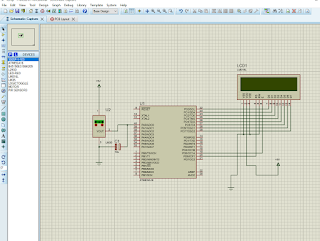
Temperature Sensor and LCD 16x2 Interfacing with ATmega16


Temperature Sensor and LCD 16x2 Interfacing with ATmega16

Proteus Design

YouTube Video Link


* GccApplication2.c
 *
 * Created: 12/12/2017 6:32:40 AM
 * Author : Om
 */
#define F_CPU 800000
#include <avr/io.h>
#include <util/delay.h>
#include <stdlib.h>
#define enable            5
#define registerselection 6

void lcd(void);
void send_a_command(unsigned char command);
void send_a_character(unsigned char character);
void send_a_string(char *string_of_characters);
int main(void)
{
DDRC = 0xFF;
DDRA = 0x00;
DDRD = 0xFF;
DDRB = 0xFF;
_delay_ms(50);
lcd();
}
void lcd(void){
ADMUX |=(1<<REFS0)|(1<<REFS1);
ADCSRA |=(1<<ADEN)|(1<<ADATE)|(1<<ADPS0)|(1<<ADPS1)|(1<<ADPS2);

int16_t COUNTA = 0;
char SHOWA [3];

send_a_command(0x01); //Clear Screen 0x01 = 00000001
_delay_ms(50);
send_a_command(0x38);
_delay_ms(50);
send_a_command(0b00001111);
_delay_ms(50);
//while (1)
//{
// ADCSRA |=(1<<ADSC);
//}

while(1)
{
ADCSRA |=(1<<ADSC);
COUNTA = ADC/4;
send_a_string ("Current temp is");
send_a_command(0x80 + 0x40 + 0);
send_a_string ("In (C) = ");
//send_a_command(0x80 + 0x40 + 8);
itoa(COUNTA,SHOWA,10);
send_a_string(SHOWA);
send_a_string ("      ");
send_a_command(0x80 + 0);
send_a_command(0x0C);

}
}
void send_a_command(unsigned char command)
{
PORTC = command;
PORTD &= ~ (1<<registerselection);
PORTD |= 1<<enable;
_delay_ms(20);
PORTD &= ~1<<enable;
PORTC = 0;
}
void send_a_character(unsigned char character)
{
PORTC = character;
PORTD |= 1<<registerselection;
PORTD |= 1<<enable;
_delay_ms(20);
PORTD &= ~1<<enable;
PORTC = 0;
}
void send_a_string(char *string_of_characters)
{
while(*string_of_characters > 0)
{
send_a_character(*string_of_characters++);
}
}


                                      Give Something to the world and it will never let you down. 
                                                                                           Onkar Dubey 


Thursday, 14 December 2017

Textual description of firstImageUrl

Automatic door open Close system using AtMega16A and PIR Sensor

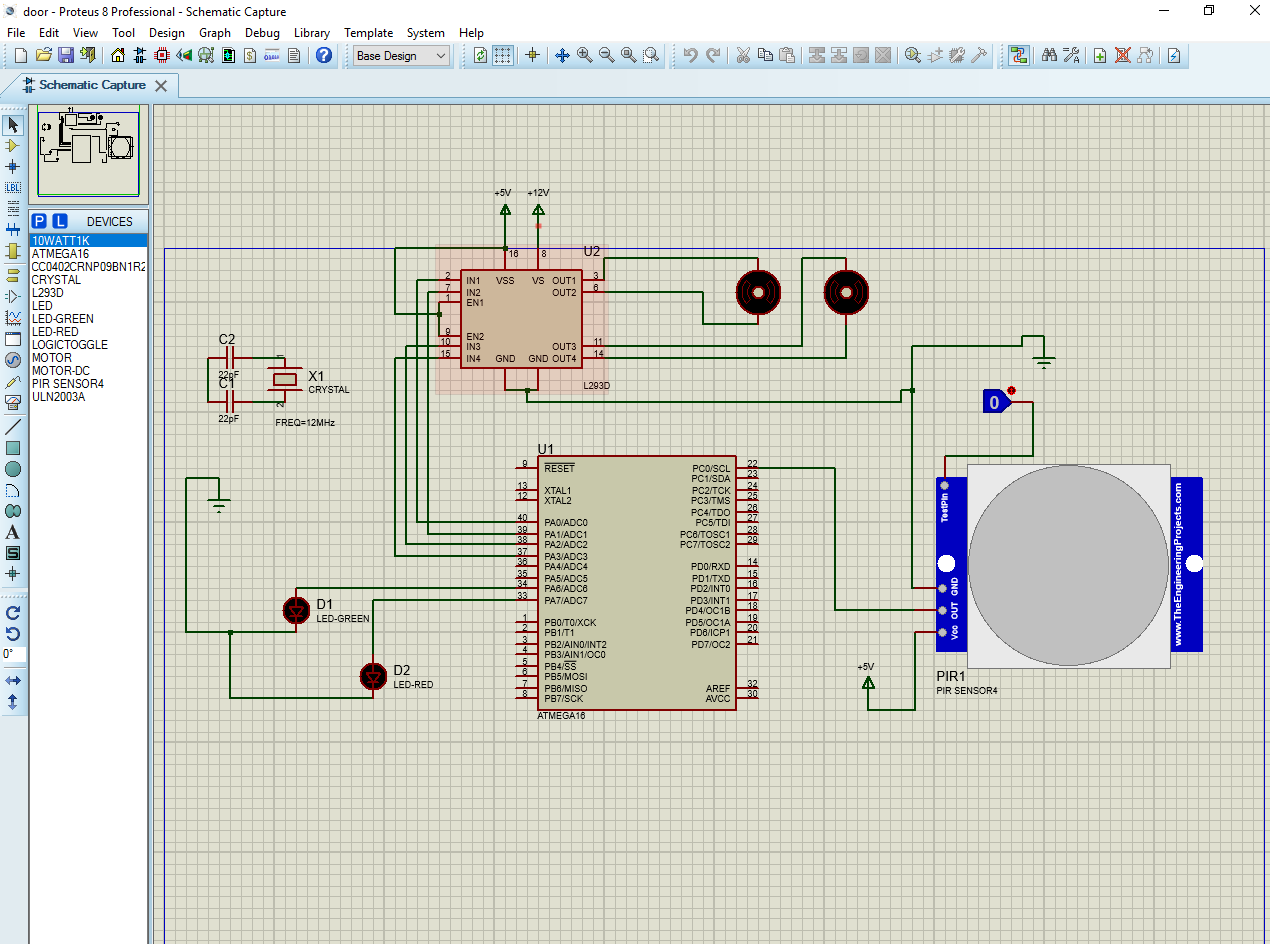
PIR Sensor and DC Motor Interfacing with ATMega16A


Instruction
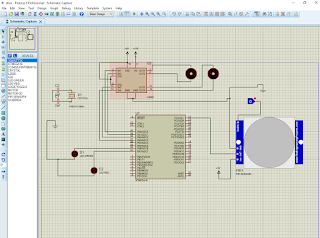
Create new project make Circuit as given figure If you do not find PIR Sensor in in your library download and the extract it and add the library to your C:// >> Labcenter Electronics>>Library
Note that " .hex, .IDX, .LIB" file should be added to library
After that click on you will find the PIR sensor and now you have to browse hex file of PIR sensor into PIR, double-click on PIR Sensor and include it
Now you are ready to browse your hex file of your code to the controller


Before applying this code you must check your delay. that means to calculate the taken time to open and close your door. this is very important. otherwise, It may possible to exceed your motor beyond the door thank you.
 * led.c
 *
 * Created: 12/8/2017 11:21:33 AM
 * Author: Om
 */ 

#ifndef F_CPU
#define F_CPU 8000000UL
#endif
#include <avr/io.h>
#include <util/delay.h>
//#define pir PORTC=0x01

int main(void)
{
DDRA = 0xff;
DDRC = 0x00;
    /* Replace with your application code */
    while (1) 
    {  
if(PINC & (1<<PORTC)){
PORTA = 0x46;//01000110 door opening
_delay_ms(1000);
PORTA = 0x8f;
_delay_ms(200);
PORTA = 0x89;//10001001 door closing
_delay_ms(1000);
PORTA = 0x00;

}
    }

}


If You want further query please comment on comment box or leave message in message box

Thank You.


                                      Give Something to the world and it will never let you down. 
                                                                                           Onkar Dubey 


Saturday, 9 December 2017

Port Programming

Port Programming 

Serial Port Opening and sending and accessing data using "AT" Commands

Instructions:

This code is verified in Linux Ubuntu 16.04.3 LTS

 First check the USB Port using following given command

echo Hello > /dev/pts/1
echo xyz > /dev/pts/2
echo ..... > /dev/pts/...
and so on...  put something on the position of ... when You get the response that means port can be use
exp:
echo Welcome > /dev/pts/6    hit enter
Welcome
if you get "Welcome" that means You can use that port.     
Change the path of the port in code and compile using
gcc -o serial_port serial_port.c
and run it using 
./serial_port

serial_port.c

#include <stdio.h>
#include <string.h>
#include <fcntl.h>
#include <termios.h>
#include <stdlib.h>
#include <unistd.h>
#include <fcntl.h>
#include <time.h>
#include <errno.h>

int main(){
    int fd;
    //char path[10];
    struct termios options;

    /* ################# Open the port #################*/

    printf("Enter com_port path\n sorry not now\n");
//    scanf("%c",&path);
    fd = open("/dev/pts/1", O_RDWR | O_NOCTTY | O_NDELAY);
if (fd == -1)
   {                                              /* Could not open the port */
     fprintf(stderr, "open_port: Unable to open /dev/pts/6 - %s\n",strerror(errno));
   }else{
printf("port opened\n");
    }

    fcntl(fd, F_SETFL, 0);

    /* ################ Get the current options ###############*/

    tcgetattr(fd, &options);

    /*############## set raw input, 1 second timeout */

    options.c_cflag     |= (CLOCAL | CREAD);
    options.c_lflag     &= ~(ICANON | ECHO | ECHOE | ISIG);
    options.c_oflag     &= ~OPOST;
    options.c_cc[VMIN]  = 0;
    options.c_cc[VTIME] = 10;

    /*################### set the options ##################*/

    tcsetattr(fd, TCSANOW, &options);

char buffer[400];  /* Input buffer */
      char *bufptr;      /* Current char in buffer */
      int  nbytes;       /* Number of bytes read */
      int  tries;        /* Number of tries so far */

      for (tries = 0; tries < 1; tries ++)
      {
       /* send an AT command*/
if (write(fd, "AT+CMGL=\"ALL\"\n", strlen("AT+CMGL=\"ALL\"\n")) < 3){
printf("command sent\n");
  continue;
if(write(fd, "AT+CMGL=\"ALL\"\r", strlen("AT+CMGL=\"ALL\"\r"))=="clc")
goto loop;

}


       /*################## Read characters into our string buffer ################*/

bufptr = buffer;

nbytes = read(fd, bufptr, buffer + sizeof(buffer) - bufptr - 1);
printf("%s\n",bufptr);

    char *p;

    p = strstr(buffer, "tin");
    printf("%s",p);

p = strstr(buffer, "server");
if(p == NULL) printf("not from server\n");
  *bufptr = '\0';
loop: close(fd);
 }

close(fd);
return 0;
}


                                      Give Something to the world and it will never let you down. 
                                                                                           Onkar Dubey 

Tuesday, 14 November 2017

Textual description of firstImageUrl

Live Project on AVR


AVR
AVR_Project
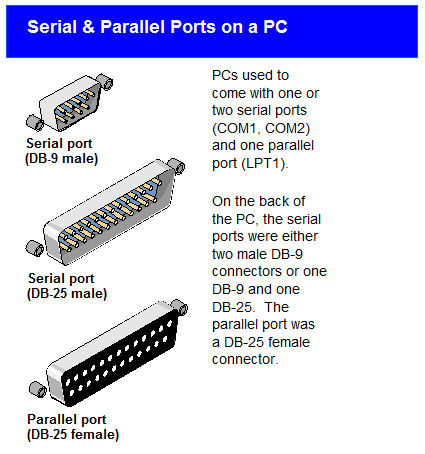
Port Programming Parallel
Serial Port
example of serial port
reference
Refrence 1
Refrence 2


  • To check USB Port in Ubuntu 
            $ lsusb -t
  • To install ubsview in Ubuntu 16.04
           $ sudo apt-get install usbview


  • ls /dev > notplugged
  • # plug in device
  • ls /dev > plugged
  • diff notplugged plugged
       if above does not work try this one


$ ls /dev 
then
$ dmesg | grep ttyS
You will get like this

put the command as in picture after that if you will get like this  it means your USB is connected at ttyS0

Now to check for any USB to serial converter use dmesg | grep tty command.


$ dpkg -l libusb-1.0*


//File: serialcon.cpp
//Description: Serial communication console program for Windows and Linux
//WebSite: http://cool-emerald.blogspot.sg/2017/05/serial-port-programming-in-c-with.html
//MIT License (https://opensource.org/licenses/MIT)
//Copyright (c) 2017 Yan Naing Aye

#include<stdio.h>
#include "Serial.h"
using namespace std;
int main()
{

#if defined (__WIN32__) || defined(_WIN32) || defined(WIN32) || defined(__WINDOWS__) || defined(__TOS_WIN__)
 Serial com("\\\\.\\COM1",9600,8,'N',1); //Windows
#else
 Serial com("/dev/ttyS0",9600,8,'N',1); //Linux
#endif

 printf("Opening port %s.\n",com.GetPort().c_str());
 if (com.Open() == 0) {
printf("OK.\n");
 }
 else {
printf("Error.\n");
return 1;
 }

 bool successFlag;
 printf("Writing.\n");
 char s[]="Hello";
 successFlag=com.Write(s);//write string
 successFlag=com.WriteChar('!');//write a character

 printf("Waiting 3 seconds.\n");
 delay(3000);//delay 5 sec to wait for a character

 printf("Reading.\n");
 char c=com.ReadChar(successFlag);//read a char
 if(successFlag) printf("Rx: %c\n",c);

 printf("Closing port %s.\n",com.GetPort().c_str());
 com.Close();
 return 0;

}


                                      Give Something to the world and it will never let you down. 
                                                                                           Onkar Dubey 


Wednesday, 8 November 2017

Textual description of firstImageUrl

Welcome to Embedded world (ARM Based)

Welcome to Embedded World


Glowing of Led Program:

using ARM LPC2148
 
#include<lpc214x.h>
void delay();
int main()
{
 IO0DIR=IO0DIR|(1<<0);
 while(1)
 {
  IO0SET=IO0SET|(1<<0);
  delay();
  IO0CLR=IO0CLR|(1<<0);
  delay();
 }
return 0;
}
void delay()
{
 unsigned int i;
 for(i=0;i<=59999;i++);
}


2-
 
 
/*#include<lpc214x.h>
void delay();
int main()
{
 IO0DIR=IO0DIR|(1<<20);
 while(1)
 {
  IO0SET=IO0SET|(1<<20);
  delay();
  IO0CLR=IO0CLR|(1<<20);
  delay();
 }
return 0;
}
void delay()
{
 unsigned int i;
 for(i=0;i<=59999;i++);
}
*/
/*
#include<lpc214x.h>
void delay();
int main()
{
 IO0DIR=IO0DIR|(1<<20)|(1<<21);
 while(1)
 {
  IO0SET=IO0SET|(1<<20)|(1<<21);
  delay();
  IO0CLR=IO0CLR|(1<<20)|(1<<21);
  delay();
 }
return 0;
}
void delay()
{
 unsigned int i;
 for(i=0;i<=59999;i++);
}
*/
/*
#include<lpc214x.h>
void delay();
int main()
{
 IO0DIR=IO0DIR|(3<<20);
 while(1)
 {
  IO0SET=IO0SET|(3<<20);
  delay();
  IO0CLR=IO0CLR|(3<<20);
  delay();
 }
return 0;
}
void delay()
{
 unsigned int i;
 for(i=0;i<=59999;i++);
}*/
/*
#include<lpc214x.h>
void delay();
int main()
{
 IO0DIR=IO0DIR|(0xf<<20);
 while(1)
 {
  IO0SET=IO0SET|(0xf<<20);
  delay();
  IO0CLR=IO0CLR|(0xf<<20);
  delay();
 }
return 0;
}
void delay()
{
 unsigned int i;
 for(i=0;i<=59999;i++);
}
*/

#include<lpc214x.h>
void delay();
int main()
{
 IO0DIR=IO0DIR|(0xff<<16);
 while(1)
 {
  IO0SET=IO0SET|(0xff<<16);
  delay();
  IO0CLR=IO0CLR|(0xff<<16);
  delay();
 }
return 0;
}
void delay()
{
 unsigned int i;
 for(i=0;i<=59999;i++);
} 


3-


#include<lpc214x.h>
void delay(int );
int main()
{ 
 int i;
 IO0DIR=IO0DIR|0xffff;
 while(1)
 {
   for(i=0;i<=15;i++)
  {
   IO0SET=(1<<i);
   delay(4);
   IO0CLR=(1<<i);
  }
 }
return 0;
}
void delay(int k)
{
 unsigned int i,j;
 for(j=0;j<=k;j++)
 {
   for(i=0;i<=59999;i++);
 }
}


LCD Programming

 8bit
 
/*
#include<lpc214x.h>
void lcd_init();
void lcdcmd(char);
void lcddata(char);
void delay(int );
int main()
{
 lcd_init(); 
 while(1)
 {
  lcdcmd(0x80);
  lcddata('A');
  delay(10);
  lcddata('B');
  delay(10);
  lcdcmd(0x01);
 }
return 0;
}
void lcd_init()
{
 IO0DIR=IO0DIR|0x7ff;
 lcdcmd(0x38);//select 8bit 5x7 mode
 lcdcmd(0x0E);//display on cursor on
 lcdcmd(0x06);//shift cursor to right
}
void lcddata(char x)
{
 IO0SET=IO0SET|x;
 IO0SET=IO0SET|(1<<8); //rs=1
 IO0CLR=IO0CLR|(1<<9); //rw=0
 IO0SET=IO0SET|(1<<10);//en=1
 delay(1);
 IO0CLR=IO0CLR|(1<<10);//en=0
 delay(2);
 IO0CLR=IO0CLR|x;
 
}
void lcdcmd(char x)
{
 IO0SET=IO0SET|x;
 IO0CLR=IO0CLR|(1<<8); //rs=0
 IO0CLR=IO0CLR|(1<<9); //rw=0
 IO0SET=IO0SET|(1<<10);//en=1
 delay(1);
 IO0CLR=IO0CLR|(1<<10);//en=0
 delay(2);
 IO0CLR=IO0CLR|x;
}
void delay(int k)
{
 int i,j;
 for(i=0;i<k;i++)
 for(j=0;j<=59999;j++);
}
*/


#include<lpc214x.h>
#include"lcd_init.h"
#include"delay.h"
#include"lcd.h"
void lcd_init();
void lcdcmd(char);
void lcddata(char);
void delay(int );
void lcdstring(char  *);
int main()
{
 lcd_init(); 
 while(1)
 {
  lcdcmd(0x80);
  lcdstring("ABCDEFGHIJKLM");
  lcdcmd(0xc0);
  lcdstring("NOPQRSTUVWXYZ");
  lcdcmd(0x01);
 }
return 0;
}
void lcdstring(char  *x)
{
 while( *x != '\0')
 {
  lcddata(*x);
  x++;
 }
} 


2-

8bit
 
#include<lpc214x.h>
#define rs 8
#define rw 9
#define en 10
void lcd_init();
void lcdcmd(char);
void lcddata(char);
void delay(int );
void lcdstring(char  *);
int main()
{
 lcd_init(); 
 while(1)
 {
  lcdcmd(0x80);
  lcdstring("ABCDEFGHIJKLM");
  lcdcmd(0xc0);
  lcdstring("NOPQRSTUVWXYZ");
  lcdcmd(0x01);
 }
return 0;
}
void lcd_init()
{
 IO0DIR=IO0DIR|0x7ff;
 lcdcmd(0x38);//select 8bit 5x7 mode
 lcdcmd(0x0E);//display on cursor on
}
void lcdstring(char  *x)
{
 while( *x != '\0')
 {
  lcddata(*x);
  x++;
 }
}

void lcddata(char x)
{
 IO0SET=IO0SET|x;
 IO0SET=IO0SET|(1<<rs); 
 IO0CLR=IO0CLR|(1<<rw); 
 IO0SET=IO0SET|(1<<en);
 delay(1);
 IO0CLR=IO0CLR|(1<<en);
 delay(2);
 IO0CLR=IO0CLR|x;
 
}
void lcdcmd(char x)
{
 IO0SET=IO0SET|x;
 IO0CLR=IO0CLR|(1<<rs);
 IO0CLR=IO0CLR|(1<<rw); 
 IO0SET=IO0SET|(1<<en);
 delay(1);
 IO0CLR=IO0CLR|(1<<en);
 delay(2);
 IO0CLR=IO0CLR|x;
}
void delay(int k)
{
 int i,j;
 for(i=0;i<k;i++)
 for(j=0;j<=59999;j++);
}


3-

4bit


#include<lpc214x.h>
#define rs 0
#define rw 1
#define en 2
void lcd_init();
void lcdcmdwrite();
void lcddatawrite();
void lcdcmd(char);
void lcddata(char);
void delay(int );
void lcdstring(char  *);
void display();
int main()
{
 PINSEL0=0x00000000;
 //PINSEL1=0x00000000;
 //PINSEL2=0x00000000;
 lcd_init(); 
 while(1)
 {
  display();
 }
return 0;
}
void display()
{
 lcdcmd(0x80);
  lcdstring("ABCDEFGHIJKLM");
  lcdcmd(0xc0);
  lcdstring("NOPQRSTUVWXYZ");
  lcdcmd(0x01);
}
void lcd_init()
{
 IO0DIR=IO0DIR|0x7f;
 lcdcmd(0x02);
 lcdcmd(0x28);
 lcdcmd(0x0E);
 lcdcmd(0x06);
}
void lcdstring(char  *x)
{
 while( *x != '\0')
 {
  lcddata(*x);
  x++;
 }
}

void lcddata(char x)
{
 IO0SET=IO0SET|((x&0xf0)>>1);
 lcddatawrite();
 IO0CLR=IO0CLR|((x&0xf0)>>1);
 IO0SET=IO0SET|(((x<<4)&0xf0)>>1);
 lcddatawrite();
 IO0CLR=IO0CLR|(((x<<4)&0xf0)>>1);
 
}
void lcdcmd(char x)
{
 IO0SET=IO0SET|((x&0xf0)>>1);
 lcdcmdwrite();
 IO0CLR=IO0CLR|((x&0xf0)>>1);
 IO0SET=IO0SET|(((x<<4)&0xf0)>>1);
 lcdcmdwrite();
 IO0CLR=IO0CLR|(((x<<4)&0xf0)>>1); 
}
void lcdcmdwrite()
{
 IO0CLR=IO0CLR|(1<<rs);
 IO0CLR=IO0CLR|(1<<rw); 
 IO0SET=IO0SET|(1<<en);
 delay(1);
 IO0CLR=IO0CLR|(1<<en);
 delay(2);
}
void lcddatawrite()
{
 IO0SET=IO0SET|(1<<rs);
 IO0CLR=IO0CLR|(1<<rw); 
 IO0SET=IO0SET|(1<<en);
 delay(1);
 IO0CLR=IO0CLR|(1<<en);
 delay(2);
}
void delay(int k)
{
 int i,j;
 for(i=0;i<k;i++)
 for(j=0;j<=59999;j++);
} 
 
 
plzz comment on comment box 


                                      Give Something to the world and it will never let you down. 
                                                                                           Onkar Dubey